
Just English
A learning platform with lessons, practice and a member area.
Designed & developed
My contribution covers interface design and application development.
- Lessons & practice
- Vocabulary
- Student account
The challenge
Bring lessons, exercises and learner progress into one product.
From first contact to independent expression
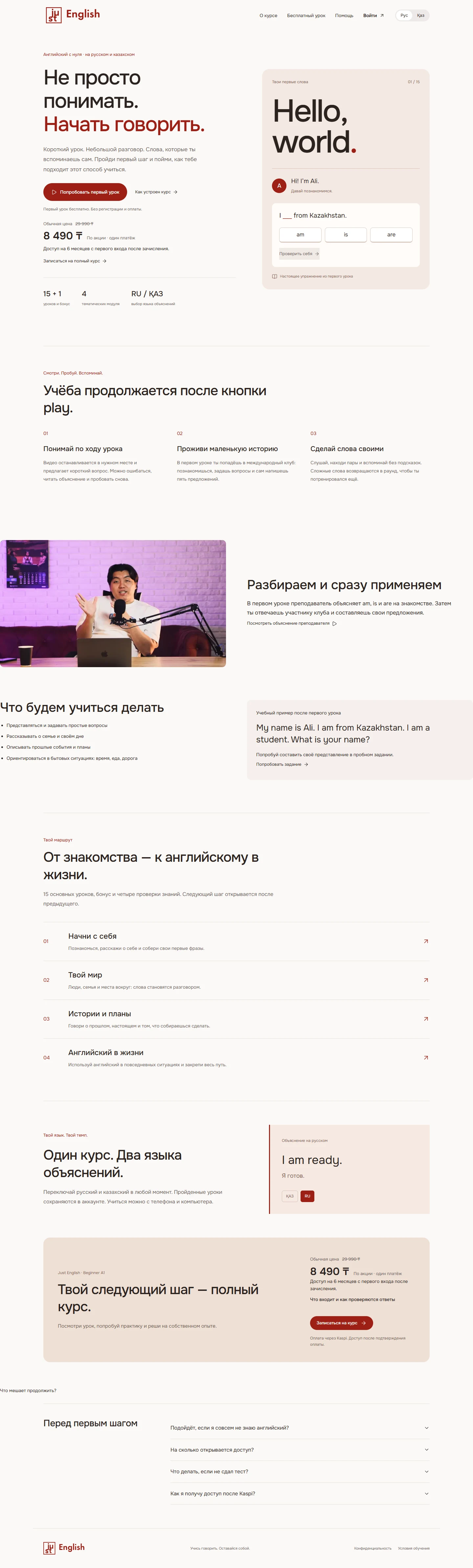
Learning follows a short cycle of explanation, application and review. The public page and free lesson let visitors experience it before registration. This case-study map summarizes the working product.
Try the method before committing
The opening view pairs the course proposition with an actual exercise. The page then explains the method, four modules, two explanation languages and access conditions. A trial lesson provides a clear next step.
Complete public page+
Keep the lesson and its plan together
Lesson, practice and vocabulary tabs separate activity types. A supporting plan keeps video, questions and exercises in sequence. Learners can return to the material and try again.
Turn grammar into a conversation
The club meeting starts with Ali’s greeting. Learners receive a role, read the situation and choose an English response. The 0 / 12 counter shows the task length, while the character, prompt and choices share one working area.
An error explains what to change
An incorrect choice highlights the selected row and explains that introducing yourself requires I’m. The dialogue remains visible, so the explanation can be applied immediately on another attempt.
Move beyond choices into text or voice
Independent practice asks for a 3–5 sentence introduction using text or voice. Self-assessment criteria and a help-used option accompany the response. The interface explicitly states that accent and free text are not automatically graded.
Recall words in context
The vocabulary view pairs a word with its translation and a phrase from the situation. Examples include audio, with a separate review round. A note explains that vocabulary practice does not block the next lesson.
Shared rules across learning activities
Shared tabs, navigation and the lesson plan connect activity types. Neutral surfaces support content, a burgundy accent marks actions, and a pale red surface marks corrections. Compare the working interface states below.
Task and feedback+
Vocabulary and independent practice+
The same learning journey on a phone
The mobile version preserves language selection and action order. The course view leads with its proposition; practice leads with the prompt and choices. These are fresh captures of the working product.
The project’s character
A warm, calm interface: a light foundation gives content room, while the red accent highlights the next step.
0123456789
#9D1F15#2B2320#FBF9F7#F4E9E3One typeface, several levels
Onest connects headlines, explanations and exercise controls. Size and weight establish hierarchy.
An interface that supports learning
Soft surfaces group dialogue, tasks and hints. Accent color is reserved for actions and important content.
The outcome
Designed and built lessons, interactive exercises, a vocabulary tool, student accounts and content management.
Visit website ↗